Bulk Actions in Sales Order
Designed bulk actions and the user journey on the sales order details page.
Problem Statement
Managing bulk SKUs in the Sales Order (SO) module was a tedious and error-prone process.
Users frequently toggled between tables to execute repetitive tasks, causing inefficiencies and delays in workflows.
Impact
The Bulk Actions feature significantly improved operational efficiency by 80%.
Reducing manual effort with streamlined workflows.
Enhancing clarity with dynamic action activation.
Delivering a consistent, user-friendly interface for managing bulk SKUs, enabling quicker decision-making and execution.
Business Requirements
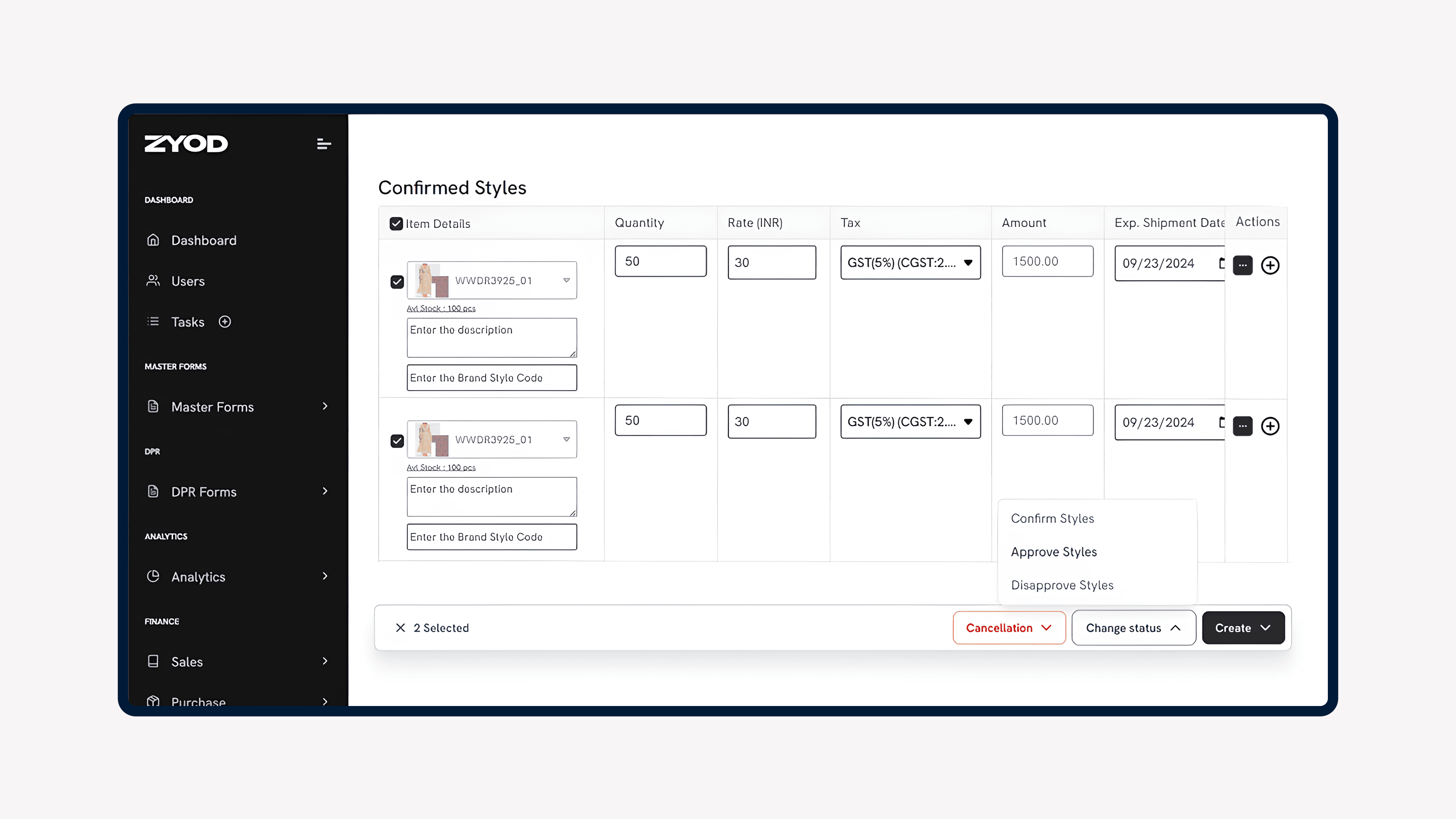
Unified Checkboxes for Bulk Selection: Allow users to select multiple SKUs in Draft, Confirmed, or Approved states.
Dynamic Enable/Disable Logic for Actions: Context-sensitive actions tailored to SKU states.
Table Pop-Ups for Key Actions: Provide instant feedback and display clear reasons for disabled actions.
Comprehensive Action Set: Tasks like Create TNA, Discard TNA, Confirm Styles, Approve Styles, and more.
Simplified UX: Ensure actions are grouped logically, with minimal redundancy.
User Problems
Repetitive Workflows: Users had to manually update each SKU, which was time-consuming.
Confusing Action Availability: Actions like "Create TNA" or "Approve Styles" were available even when prerequisites weren’t met, leading to errors.
Fragmented Interface: Critical actions were scattered across different components, creating usability challenges.
User Needs
Automated Context-Aware Actions: Ensure only the applicable actions are visible and executable based on SKU states.
Clear Feedback: Provide tooltips or pop-ups for disabled actions, explaining reasons to improve clarity and reduce confusion.
Simplified Navigation: Combine all actions within one dropdown for easy access without overwhelming users.
Error Prevention: Enforce validation logic to prevent incompatible or unintended bulk actions.
Solution
The Bulk Actions feature was designed as a comprehensive, dynamic, and user-centered component for managing multiple SKUs in the SO module.
Key Features Unified Bulk Action: Design consolidating all actions.
Dynamic Enable/Disable Logic: Context-aware design helping users determine action availability based on SKU states (Draft, Confirmed, Approved).
Example: When 2 Draft SKUs are selected:
Active Actions: Remove Styles, Discard TNA, Confirm Styles.
Disabled Actions: Create TNA, Cancel Styles, Create Invoice.Pop-Ups for Key Actions: Introduced contextual pop-ups for actions like Confirm Styles or Discard TNA, providing additional feedback when disabled.