Price Variation in SO and PO
Enable seamless integration between Sales Orders (SO) and Purchase Orders (PO) for real-time price adjustments.
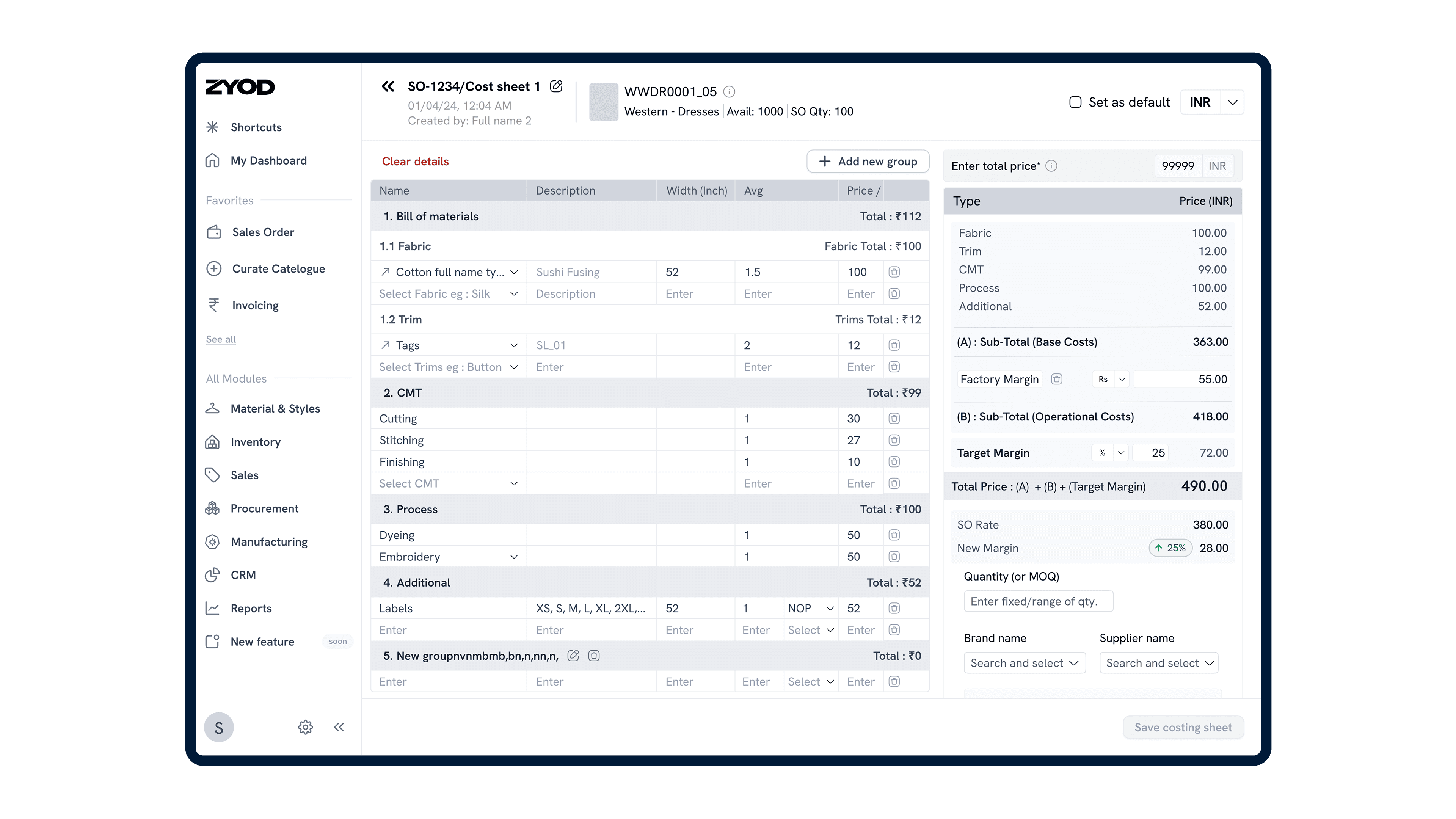
Problem Statement
Managing pricing and cost sheet data between Sales Orders (SO) and Purchase Orders (PO) was inefficient and error-prone.
Users had to manually update cost sheets and optimal price variations, leading to delayed processing, misaligned data, and inaccuracies in pricing, costing, and margin calculations.
Impact
The integration of cost sheet management in SO and optimal price variation in PO streamlined workflows and enhanced operational accuracy by:
Reducing manual effort through automated fetching of default costs and optimal prices from the Style Curation module.
Ensuring real-time visibility with seamless data updates and synchronization across SO and PO modules.
Enhancing accuracy by minimizing errors in pricing, costing, and margin calculations.
The Costing Table design
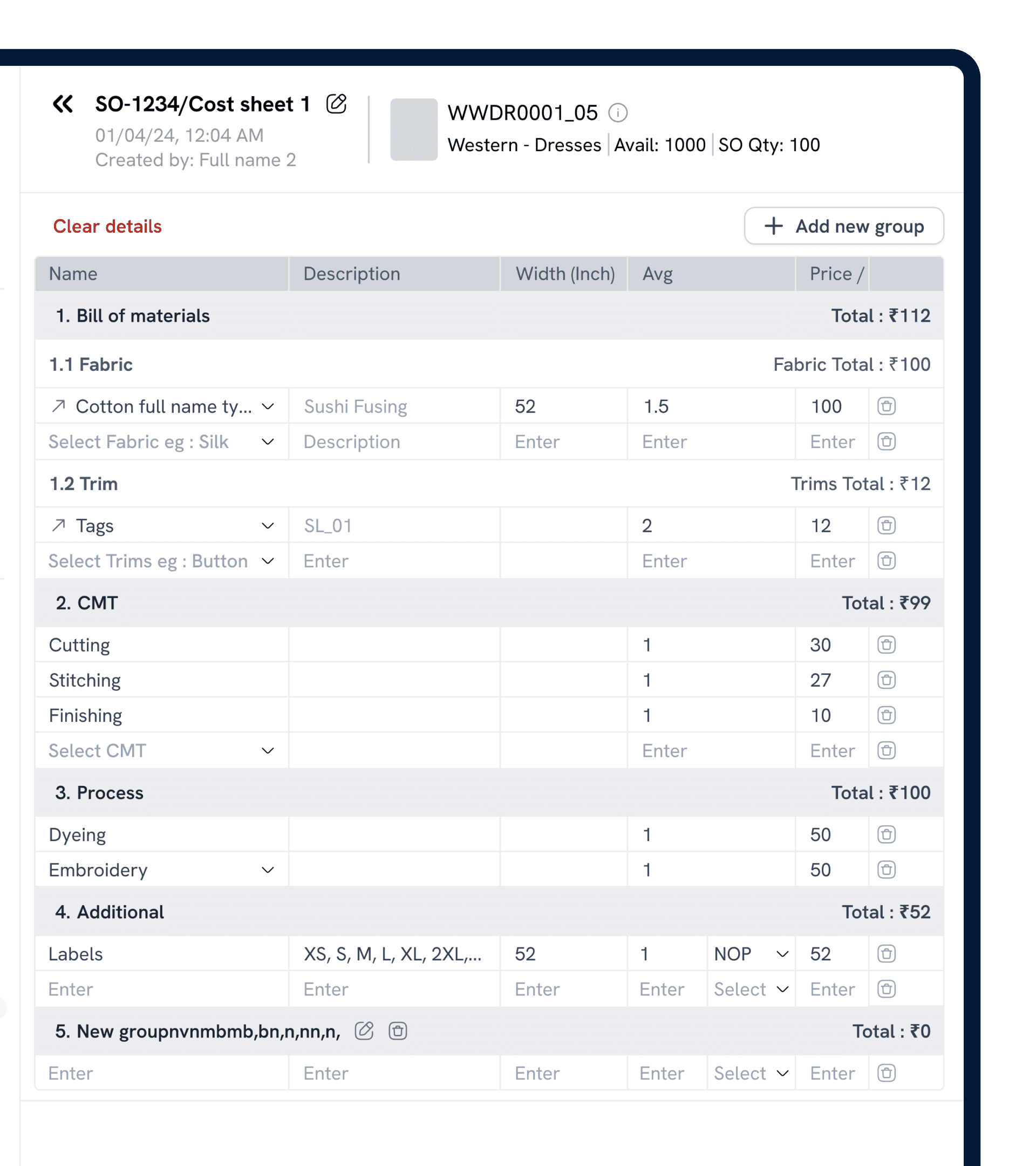
Clear Hierarchy: Numbered and nested sections make cost items easy to locate and organize.
Inline Editing: Spreadsheet-style, direct field entry ensures quick updates and real-time totals.
Immediate Totals: Sectional totals are always visible, so users instantly see cost impact.
Flexible Grouping: "+ Add new group" accommodates custom client or process needs.
Quick Actions: Inline edit and remove options enable fast adjustments.
The Costing Summary design
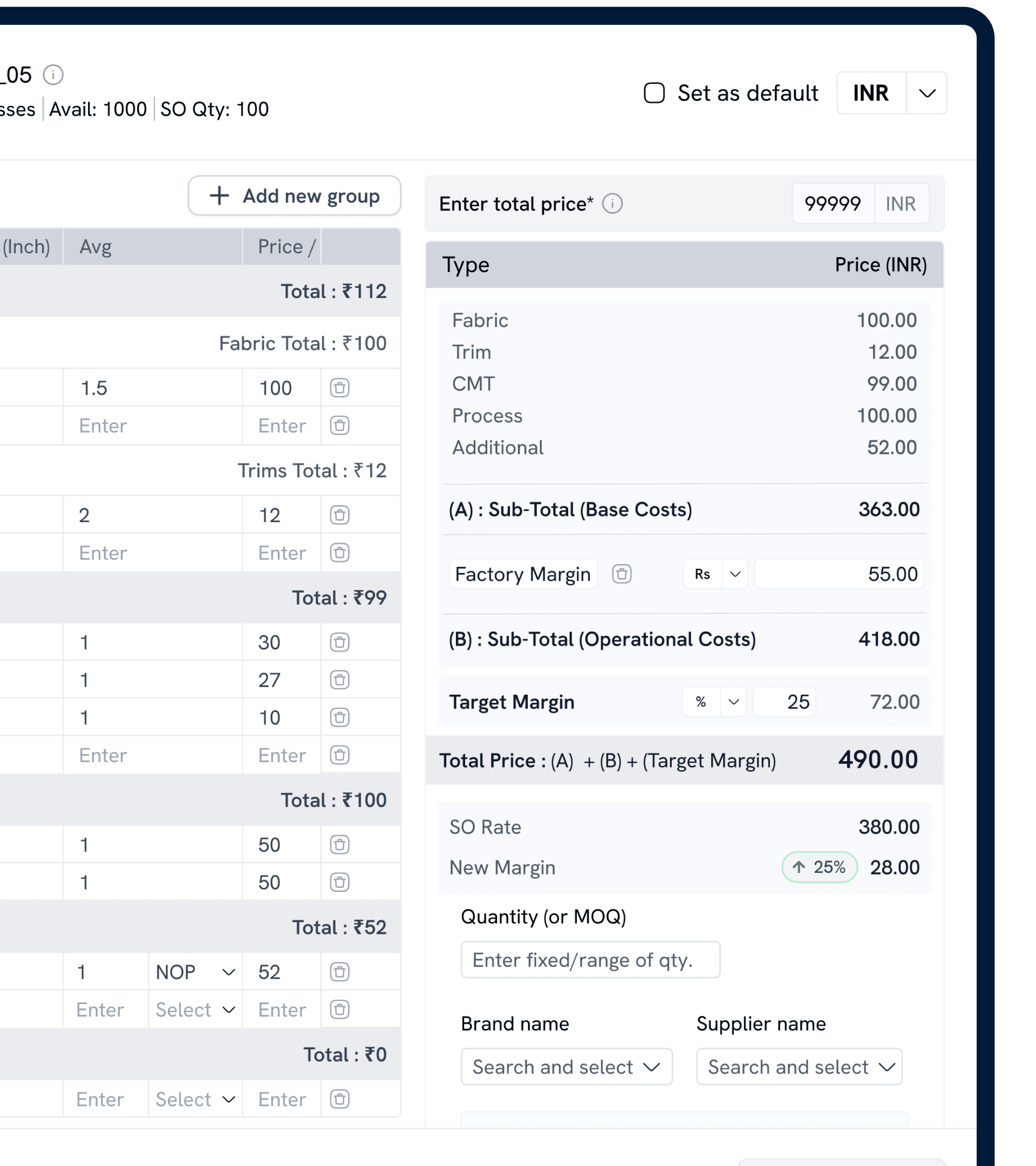
Category Breakdown: Shows major cost components side-by-side for quick validation.
Subtotal Logic: Groups costs into Base and Operational, mirroring real-world factory costing.
Live Price Calculation: Instantly updates totals and margins when values change, supporting negotiation.
Margin Visibility: Highlights margin shifts and SO Rate for fast profitability checks.
Action-Ready Inputs: MOQ, brand, and supplier fields streamline the jump from costing to procurement.
Business Requirements
Cost Sheet Integration with SO: Allow users to add and edit cost sheets directly from the Sales Order module during Draft and Confirm statuses.
Optimal Price Addition in PO: Enable users to add and modify optimal price variations in the Purchase Order module seamlessly.
Real-Time Synchronization: Automatically fetch default cost and optimal price values from the Style Curation module during SO and PO creation.
User-Centric Flexibility: Provide customization options for updating costs, margins, and groups within cost sheets.
User Problems
Time-Consuming Manual Updates: Users manually updated cost sheet and price values for every SKU, causing inefficiencies.
Disconnected Pricing Workflows: A lack of integration between SO, PO, and Style Curation modules led to inconsistent pricing decisions.
Inconsistent Data Visibility: Users couldn’t access important pricing and margin data during certain workflows.
Error-Prone Calculations: Frequent discrepancies in manual margins and cost calculations resulted in inaccuracies.
User Needs
Seamless Cost Sheet and Price Updates: Automated fetching of cost sheet and optimal prices ensures accuracy and reduces manual intervention.
Editing and Customization: Tools to update costs, margins, groups, and SKU details within cost sheets.
Real-Time Pricing Visibility: Display SO prices and margins in the cost sheet for better decision-making.
Simplified Optimal Price Workflows: Maintain existing PO processes with added flexibility for pricing updates.
Error Prevention: Synchronize modules to avoid mismatched or outdated data.
Solution
Cost Sheet Integration with Sales Order (SO)
Enabled users to directly manage cost sheet data for SKUs within the SO module.
Add Costs for a Style: Auto-fetch default cost sheets from the Style Curation module.
Edit Cost Sheets: Update costs, margins, groups, and SKU details within the SO module.
SO Price and Margin Visibility: Display SO-specific pricing and margin data to enable informed decisions.
Optimal Price Addition in Purchase Order (PO)
Default Price Fetch: Auto-fetch optimal prices for relevant SKUs from the Style Curation module.
Adjustable Pricing: Flexibility to update optimal prices dynamically.
Streamlined Interface: Provide focused decision-making by excluding unnecessary data.
Default Fetching: Ensure both SO and PO modules pull the latest cost and price data from the Style Curation module.
Error Alerts: Add validation logic to prevent saving incomplete or inconsistent cost sheets.