Filters
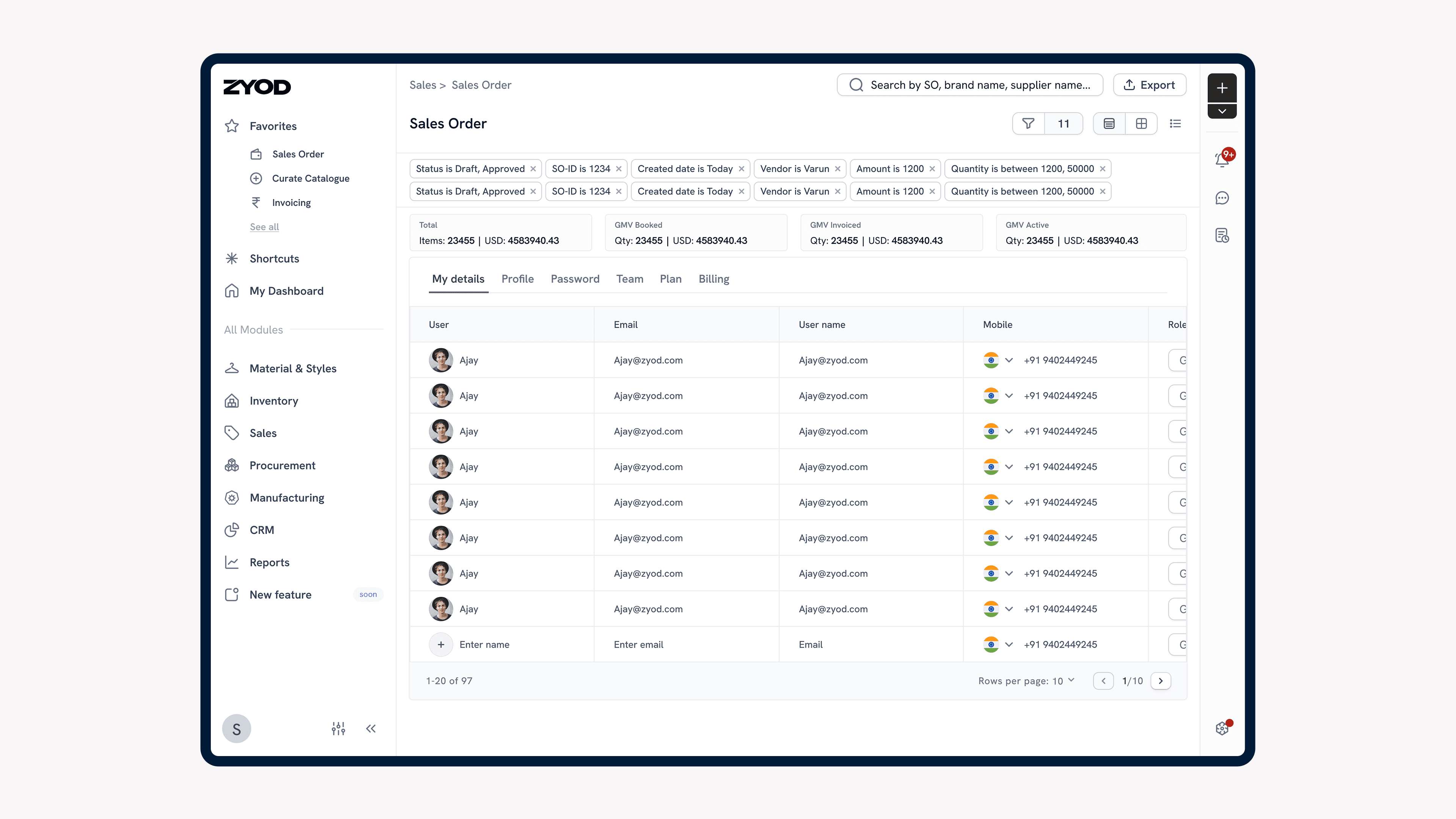
Designed scalable filters for the erp.
Problem Statement
Inconsistent filter capabilities across ERP modules resulted in inefficient workflows and user frustration.
Lack of scalability in existing systems prevented advanced filtering for complex queries.
Poor visibility of applied filters led to confusion and redundant actions.
Manual and time-consuming processes for applying and removing filters reduced productivity.
Impact
Scalability: A modular filter design adaptable across all ERP modules, meeting current requirements while supporting future enhancements.
Enhanced Visibility: Active filters displayed as intuitive, interactive tags, allowing users to easily understand, edit, or remove filters.
Improved Efficiency: Filters could be applied or removed quickly using streamlined interaction patterns, reducing data retrieval time by up to 80%.
User-Friendly Interactions: Clear interface elements such as dropdowns, real-time validation, and visual cues improved navigation and usability.
Business Requirements
Scalable Design: Create a modular filtering system adaptable for current and future needs.
Enhanced Visibility: Provide clear, intuitive display of applied filters as interactive tags.
Quick Interactions: Enable fast application and removal of filters with minimal effort.
Context-Aware Filters: Support data-type-specific filters, such as numeric ranges, text searches, and date selectors.
Consistency: Ensure a uniform filtering experience across all ERP modules.
User-Friendly Features: Include sorting and easy-to-use interfaces for filter management.
Research Insights
Scalable Design: Create a modular filtering system adaptable for current and future needs.
Enhanced Visibility: Provide clear, intuitive display of applied filters as interactive tags.
Quick Interactions: Enable fast application and removal of filters with minimal effort.
Context-Aware Filters: Support data-type-specific filters, such as numeric ranges, text searches, and date selectors.
Consistency: Ensure a uniform filtering experience across all ERP modules.
User-Friendly: Include sorting and easy-to-use interfaces for filter management.
User Problems
Inefficiency in Applying Filters: Users spent too much time navigating inconsistent or missing filter implementations across modules.
Error-Prone Interpretation of Active Filters: Limited visibility of applied filters often led to confusion or redundant actions.
Lack of Scalability: Current systems couldn’t support advanced filtering needs, such as combining multiple conditions in complex workflows.
Cumbersome User Interactions: manual application and removal of filters were tedious.
User Needs
Quick and Context-Sensitive Filters: Efficient application of filters depending on the data type (e.g., text search, numeric ranges, date selectors).
Clear Filter Visibility: A filter visualization system (e.g., tags) to ensure users can easily track, edit, or remove active filters.
Scalable and Customizable Filtering: Advanced capabilities, such as combining multiple conditions and saving filter presets, for repetitive workflows.
Simple Interactions: Minimized clicks and intuitive UI patterns for applying and resetting filters.
Consistent Experience Across Modules: Uniform design language and patterns to reduce redundancy and training time.
Solution
Column-Specific Filtering
Added column-based filtering in tables to allow filters on individual data points such as statuses, dates, buyer names, etc.
Filter types dynamically adapted to data types: Text Filters: Operators like "Contains" and "Exact Match."
Numeric Filters: Logical operators like "Greater Than," "Less Than," and ranges.
Date Filters: Calendar-based range selection (e.g., "Last 7 days").
Predefined Lists: Dropdowns for categorical data like style status or approval stage.
Tag-Based Filter Visualization
Active filters were displayed as tags above the table, showing the conditions explicitly.
Tags provided interactive options for:
Editing: A single click on a tag reopened the filter modal for adjustment.
Removal: Users could remove filters by clicking the “X” on a tag or via a “Reset Filters” button for all filters.
Designed intuitive hover and click states for dropdowns and buttons, making filter and sort actions accessible with minimal friction.
Reduced the average time to update or clear filters by simplifying interactions.
Scalable Architecture.
Future Scope
Advanced Filters with Group Logic: Introduce grouped filters with AND/OR logic, enabling complex condition-based searches (e.g., “Orders for Summer’24 AND Approved Stage OR Sampling Stage”).
Saved Filter Presets: Allow users to save and reuse combinations of filters for repetitive workflows, such as weekly production planning.
Global Search Integration: Develop a unified global search that allows cross-module filters and searches.
Predictive Filtering with AI: Use machine learning to suggest relevant filter combinations based on user behavior and historical data.